टैली प्राइम मे नया लेजर बनाना || Creating New Ledger in Tally Prime
Tally Prime मे दो लेजर Cash A/c और Profit & Loss A/c पहले से बने होते है। एक नया लेजर निम्न प्रकार से बनाया जा सकता है।
In Tally Prime, two ledgers, Cash A/c and Profit & Loss A/c, are created by default. A new ledger can be created in the following way.
Path : Gateway of Tally>Create>Ledger
Ledger Creation
- Ledger Name : Institute Rent A/c
- Under : Indirect Expenses
- Accept
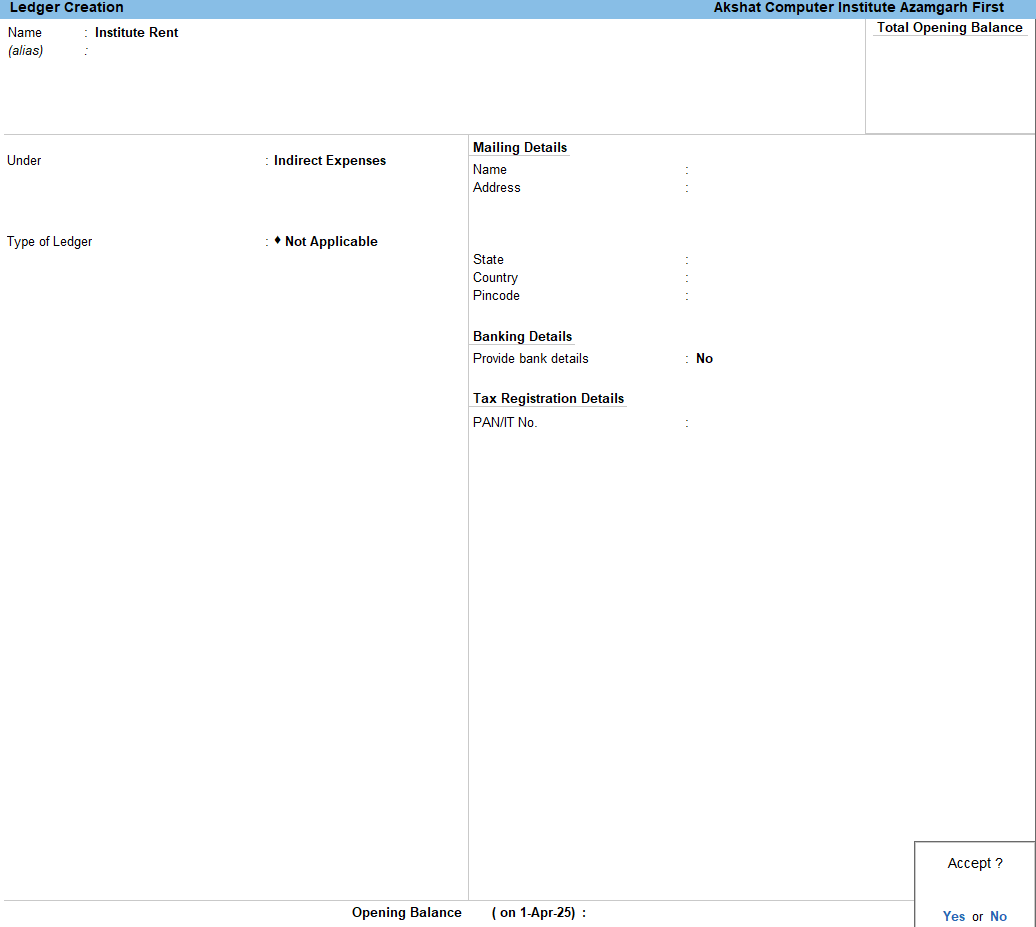
नोट – लेजर बनाते समय, Name और Under के अलावा कई और विकल्प भी आते हैं जिन्हे जरूरी हो तो सेट करे, नहीं तो डिफ़ॉल्ट सेट रहने दें। अलग-अलग प्रकार के लेजर के लिए अलग-अलग ऑप्शन आते है, जैसे किसी पार्टी का लेजर बनाते वक्त उसकी Contact Details तथा Bill Details भरने के लिए ऑप्शन आते है, बैंक की लेजर बनाते वक्त Bank Details के ऑप्शन व किसी संपत्ति व खर्चों के लेजर के लिए उनके अनुसार ऑप्शन आते है, जिन्हे आप जरूरत के अनुसार सेट कर सकते हैं। मुख्य रूप से आपको Ledger Name और Under Group भरना होता है।
डिटेल्स भरने के बाद Ledger Creation स्क्रीन Accept कर लें। इसी तरह अन्य लेजर भी बना सकते हैं।
When creating a ledger, in addition to the Name and Under fields, several other options are available. You can set these if needed, otherwise, leave them at their default settings. Different types of ledgers have different options. For example, when creating a party ledger, options for filling in Contact Details and Bill Details are available. When creating a bank ledger, options for Bank Details are available, and for asset and expense ledgers, relevant options are provided. You can set these options as needed. Primarily, you need to fill in the Ledger Name and the Under Group.
After filling in the details, accept the Ledger Creation screen. You can create other ledgers in the same way.
लेजर को अपडेट/डिलीट करना | Ledger Update/Delete
Path : Gateway of Tally>Alter>Ledger
टैली प्राइम मे यूजर द्वारा बनाए किसी भी लेजर को अपडेट या डिलीट करने के लिए ऊपर दिए गए पाथ के अनुसार लेजर ओपन करें, अब अगर लेजर को अपडेट करना है तो लेजर डिटेल्स को चेंज करके Accept कर लें। इस तरह लेजर अपडेट हो जाएगा।
यदि लेजर को डिलीट करना है तो लेजर को ओपन करे तथा Alt + D प्रेस करे तथा कान्फर्मैशन के लिए Yes करें, इस तरह लेजर डिलीट हो जाएगा। ध्यान रहे जिस लेजर को डिलीट कर रहे है उसका उपयोग वाउचर एंट्री मे नहीं होना चाहिए नहीं तो लेजर डिलीट नहीं होगा। इसके लिए पहले एंट्री डिलीट करनी होगी।
In Tally Prime, to update or delete any ledger created by the user, open the ledger using the path given above. Now, if you want to update the ledger, change the ledger details and accept the changes. The ledger will be updated.
If you want to delete the ledger, open the ledger and press Alt + D, then confirm by selecting Yes. The ledger will be deleted. Please note that the ledger you are trying to delete should not be used in any voucher entry; otherwise, the ledger will not be deleted. You will have to delete the entry first.