Important Notice:

Course Content
Taxation
Tally Prime Notes
About Lesson

Currency Rate of Exchange Setup || करेंसी रेट ऑफ एक्सचेंज सेटप करना

करेंसी बनाने के बाद करेंसी का Rate of Exchange सेट करना होता है। यह फीचर Foreign Currency बनाने के बाद Accounting Master में स्वतः डिस्प्ले होता है। Rate of Exchange में Base Currency के साथ Foreign Currency के रेट्स को एक्सचेंज किया जाता है, जिससे विदेशी मुद्रा में Purchase/Sales करते वक्त मूल्यों को Base Currency में कन्वर्ट किया जा सके। Rate of Exchange निम्न तरह सेट करेंगे।   

After creating a currency, you need to set its rate of exchange. This feature is automatically displayed in Accounting Master after creating a foreign currency. The rate of exchange exchanges the foreign currency’s rates with the base currency, allowing prices to be converted to the base currency when making purchases/sales in foreign currencies.                                                                                                                                                                                                                                                                                                                                                                                                                                                                                                                                                                                                                                                                                                                                                                                                                                                                                                                                                                                                                                                                                                                                                                                                                                                                                                                                                                                                                                                                                                                                                                                                                                                                                                                                                                                                                                                                                                                                                                                                                                               

Path : Gateway of Tally>Create>Rate of Exchange

  • Date : 01-04-2024 (इसमे डेट दर्ज करेंगे जिस डेट मे सेटअप बना रहे हैं)
  • Currency : $ (US Dollar) (इसमे Foreign Currency सेट करेंगे)
  • Std Rates : ₹83/$ (इसमे Base Currency का Foreign Currency के साथ स्टैन्डर्ड रेट सेट करेंगे)
  • Date: 01-04-2024 (Enter the date for which you are creating the setup)
  • Currency: $ (US Dollar) (Set the foreign currency here)
  • Std Rates: ₹83/$ (Set the standard rate for the base currency and the foreign currency here)

नोट – यहाँ Standard Rates को ₹83/$ के हिसाब से सेट किया गया है तथा Selling/Buying Rates खाली रखा है। ऐसा इसलिए क्योंकि जो भी सौदे होंगे वो Standard Rates के अनुसार होंगे, फिर अगर कभी Rates कम या ज्यादा होते है तो एंट्री के दौरान बदले भी जा सकते हैं।  

Note – Standard Rates are set at ₹83/$, and Selling/Buying Rates are blank. This is because all transactions will be based on Standard Rates, but if rates change, they can be changed during entry.

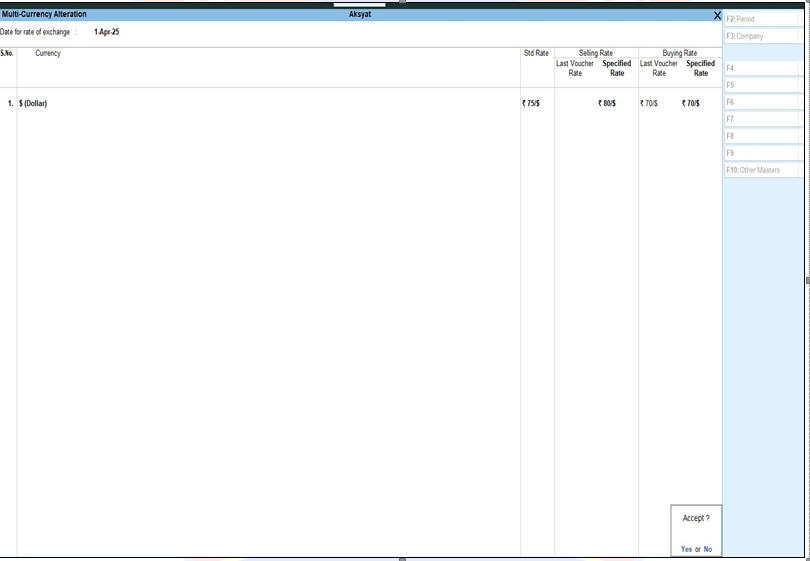
Rate of Exchange मे निम्न फॉर्मेट की तरह सभी डिटेल्स भरने के बाद Accept कर लेंगे।

After filling all the details in the following format in Rate of Exchange, it will be accepted.
error: Content is protected !!