Making Entry for Forex Gain/Loss Adjustment फोरेक्स लाभ/हानि अडजस्टमेंट एंट्री बनाना
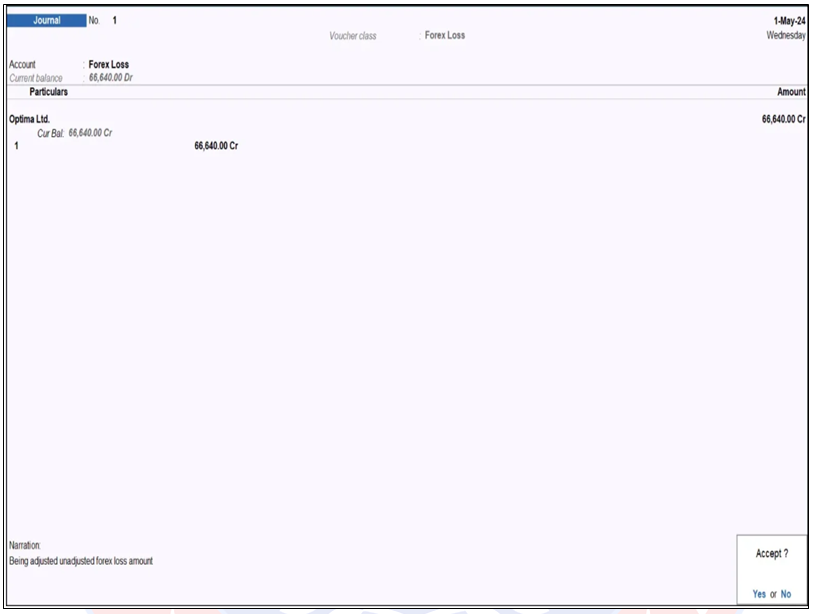
चूंकि Optima Ltd. के साथ खरीददारी करने पर Forex Loss हुआ है, इसलिए इसकी एंट्री जर्नल वाउचर मे Forex Loss Class मे बनाएंगे।
Since there is a Forex Loss on the purchase made with Optima Ltd., its entry will be made in the Forex Loss Class in the Journal Voucher.
Path : Gateway of Tally>Voucher>Journal (F7)>Forex Loss
Particulars : Optima Ltd.
Bill-wise Details : इसमे Pending Bills no 1 को सिलेक्ट करें।
In this, select Pending Bills no. 1.
यह औटोमेटिक Unadjusted Forex Gain/Loss वैल्यू को अजस्ट कर लेगा।
इसके बाद वाउचर को Accept कर लेंगे।
This will automatically adjust the Unadjusted Forex Gain/Loss value.
Then the voucher will be accepted.
Forex Loss की एंट्री करने के बाद अब बलेन्स शीट देखेंगे तो Unadjusted Forex Gain/Loss मे जो अमाउन्ट दिखाई दे रहा था वह अब क्लीयर हो जाएगा।
इस तरह Tally मे Foreign Currencies का इस्तेमाल करके किसी भी देश से माल को Purchase अथवा Sales किया जा सकता है, तथा Currency Rate मे हुए बदलावों के कारण Forex Gain/Loss वैल्यू को भी अडजस्ट किया जा सकता है।
After entering the Forex Loss, if you look at the Balance Sheet, the amount which was visible in Unadjusted Forex Gain/Loss will now be cleared.
In this way, goods can be purchased or sold from any country using Foreign Currencies in Tally, and the Forex Gain/Loss value can also be adjusted due to changes in the currency rate.
Foreign Currency Alt Codes for Tally Prime
|
Alt Code |
Symbol |
ISO Code |
Name |
|
Alt + 156 |
£ |
GBP |
Pound |
|
Alt + 0128 |
€ |
EUR |
Euro |
|
Alt + 36 |
$ |
USD |
Dollar |
|
Alt + 157 |
¥ |
YEN |
Yen |
|
Alt + 4 (Number Row) |
₹ |
INR |
Rupee |