Check Interest Calculation Report (ब्याज गणना की रिपोर्ट देखना)
माना पार्टी (Sharma Enterprises) को 1-4-2024 को 30 दिन का टाइम देकर उधार माल बेचा गया, इस प्रकार से पार्टी की पेमेंट डेट 1-5-2024 होगी। अब अगर पार्टी ने 1-6-2024 को पेमेंट किया तो उस पार्टी पर ब्याज की गणना को निम्न प्रकार से देख सकते हैं।
Suppose goods were sold on credit to the party (Sharma Enterprises) on April 1, 2024, with a 30-day payment term. This means the payment due date is May 1, 2024. Now, if the party makes the payment on June 1, 2024, the interest calculation for that party can be seen as follows.
Path: Gateway of Tally>Display More Reports>Statements of Accounts>Interest Calculation>Interest Receivable/Payable
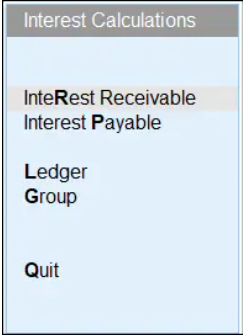
चूंकि यहाँ हम कस्टमर पार्टी का Interest Calculation रिपोर्ट देख रहें हैं तो Interest Receivable ऑप्शन सिलेक्ट करेंगे।
Since we are viewing the Interest Calculation report for the customer party here, we will select the Interest Receivable option.
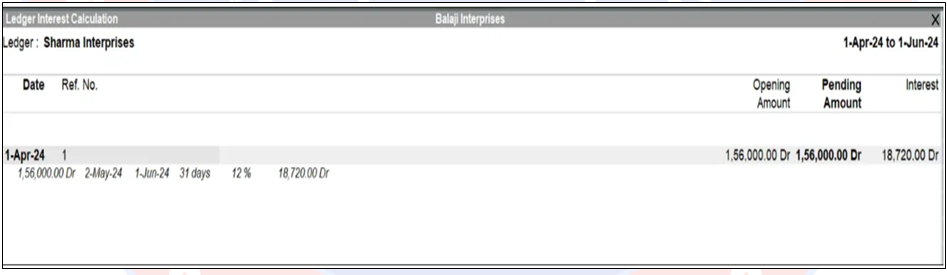
ब्याज की गणना व पार्टी से संबन्धित ब्याज के ब्योरे को Interest Calculation रिपोर्ट से देख सकते है, यहाँ हम देख सकते हैं की किस अवधि से पार्टी पर ब्याज लागू हुआ है और कितने दिनों का किस रेट से कितना ब्याज बना।
The interest calculation and details related to the interest charged to a party can be viewed in the Interest Calculation report. Here, we can see the period from which interest was applied to the party, the number of days for which interest was calculated, the interest rate, and the total interest amount.
यहाँ पीरियड बदलने के लिए Alt+F2 कुंजी दबाये तथा जब से जब तक की ब्याज रिपोर्ट देखनी है वो तिथियाँ दर्ज करे।
To change the period, press the Alt+F2 key here and enter the start and end dates for which you want to view the interest report.
अब जो भी पार्टी पर ब्याज बना है इसे पार्टी के खाते मे निम्न प्रकार से जोड़ेंगे, क्योंकि पार्टी का खाता केवल वास्तविक बलेन्स (Sales Value) दिखाएगा अतिरिक्त ब्याज स्वतः ही पार्टी के खाते मे ऐड (Add) नहीं होगा। इसे निम्न प्रकार से करना होगा।
Now, the interest accrued on the party’s account will be added to the party’s account as follows, because the party’s account will only show the actual balance (Sales Value); the additional interest will not be added to the party’s account automatically. This needs to be done manually as described below.