Create Voucher Class for Interest Calculation
(ब्याज गणना के लिए वाउचर क्लास बनाना)
Interest Calculation रिपोर्ट से केवल ब्याज की जानकारी प्राप्त की जा सकती है तथा पार्टी का अकाउंट केवल वास्तविक क्लोसिंग बैलेन्स प्रदर्शित करता है। इसलिए ब्याज की राशि को खाते मे जोड़ने के लिए निम्न तरह वाउचर क्लास का प्रयोग करेंगे।
The Interest Calculation report only provides information about the interest, and the party’s account only displays the actual closing balance. Therefore, to add the interest amount to the account, we will use the following type of voucher class.
Path : Gateway of Tally>Alter>Voucher Type>Debit Note
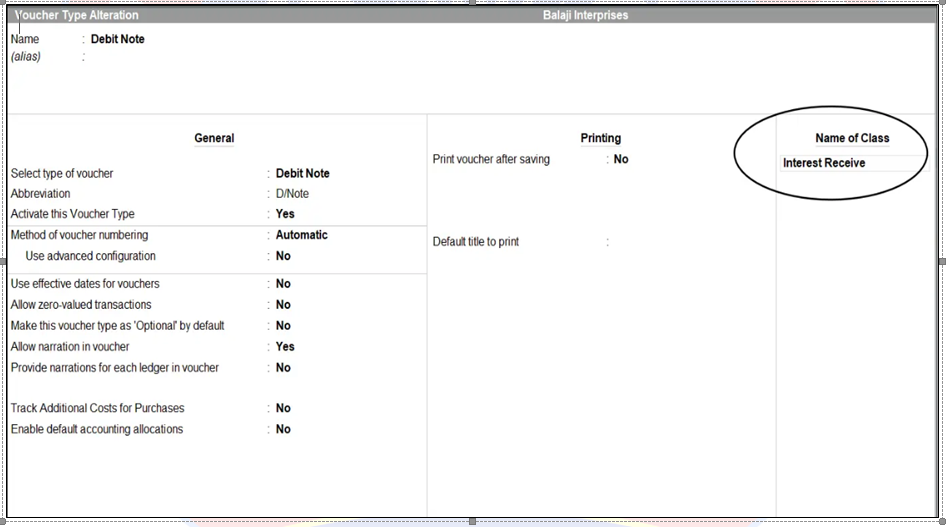
Note: ब्याज की प्राप्ति के लिए डेबिट नोट वाउचर (Debit Note Voucher) तथा भुगतान के लिए क्रेडिट नोट वाउचर (Credit Note Voucher) का प्रयोग करते है। डेबिट नोट वाउचर को आल्टर करने के बाद Name of Class मे Interest Received लिखकर एंटर कुंजी दबाएँगे तो निम्न प्रकार से वाउचर टाइप क्लास स्क्रीन प्रदर्शित होगी जिसे निम्न प्रकार से भरें।
Note: Debit Note Vouchers are used for receiving interest, and Credit Note Vouchers are used for making payments. After altering the Debit Note Voucher, enter “Interest Received” in the “Name of Class” field and press the Enter key. The following Voucher Type Class screen will be displayed, which should be filled out as follows.
- Class Name : Interest Received
- Use class for interest accounting : Yes
- Amount to be treated as Compound Interest : No
- Accept
वाउचर क्लास स्क्रीन एक्सेप्ट करने के बाद Debit Note Voucher को एक्सेप्ट कर लें, और फिर निम्न प्रकार से पार्टी के अकाउंट मे ब्याज अजस्टमेंट की एंट्री बनाएं।
After accepting the Voucher Class screen, accept the Debit Note Voucher, and then create the interest adjustment entry in the party’s account as follows.