Use Voucher Class for Interest Adjustment
(ब्याज अजस्टमेंट के लिए वाउचर क्लास का प्रयोग करना)
जैसा की ऊपर बताया गया है इन्टरेस्ट रिसीव (Interest Receive) से संबंधित एंट्री बनाने के लिए डेबिट नोट वाउचर का उपयोग करेंगे और ब्याज पेमेंट के लिए क्रेडिट नोट वाउचर का उपयोग करेंगे। चूंकि यहाँ पार्टी का Interest Receive से संबंधित एंट्री बनानी है जिसे निम्न प्रकार से बनाएंगे।
As mentioned above, we will use a debit note voucher to create the entry related to interest received and a credit note voucher for interest payments. Since we need to create an entry related to interest received from the party, we will do so as follows.
Path : Gateway of tally>Voucher Types>Debit Note (Alt+F5)

- उपरोक्त पाथ इंटर करने के बाद डेबिट नोट वाउचर खुलेगा जिसे निम्न प्रकार से भरें।
- वाउचर क्लास मे Interest Received सिलैक्ट करे।
- अब F2 कुंजी दबाकर Date एंटर करे, Date वह दर्ज करें जिस डेट मे पार्टी ने भुगतान किया है।
- Dr. (Debit) फील्ड मे पार्टी सिलैक्ट करे Sharma Enterprises
- पार्टी सिलेक्ट करने के बाद ब्याज की विवरण सूची प्रदर्शित होगी यहाँ से Interest Bill सिलैक्ट करे।
- After entering the above path, the Debit Note voucher will open, which you should fill out as follows:
- In the Voucher Class, select Interest Received.
- Now press the F2 key and enter the Date; enter the date on which the party made the payment.
- In the Dr. (Debit) field, select the party Sharma Enterprises.
- After selecting the party, the list of interest details will be displayed; select the Interest Bill from here.
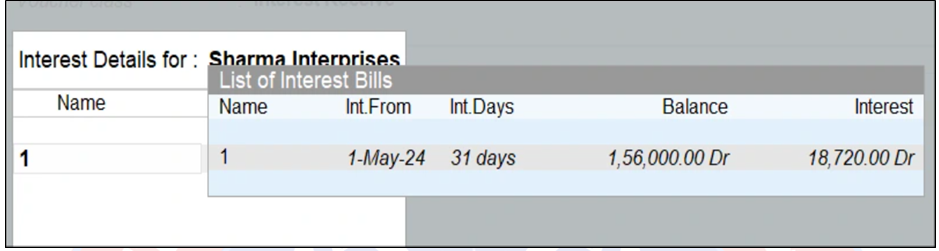
- पार्टी की Interest details मे बिल रिफ्रेन्स सिलेक्ट करे।
- इसके बाकी ऑप्शन को डिफ़ॉल्ट एक्सेप्ट करते जाएं।
- Cr. (Credit) फील्ड मे Interest Received लेजर सिलैक्ट करे।
- सभी डिटेल्स भरने के बाद वाउचर एक्सेप्ट करें।
- In the party’s Interest details, select the Bill Reference.
- Accept the remaining options as default.
- In the Cr. (Credit) field, select the Interest Received ledger.
- After filling in all the details, accept the voucher.
इस प्रकार से जो भी ब्याज पार्टी पर बनता है वह इस मेथड के द्वारा पार्टी के वास्तविक बलेन्स मे जुड़ (Add) जाएगा तथा Interest Calculation Report से क्लीयर हो जाएगा।
कस्टमर के अकाउंट मे ब्याज अजस्ट हुआ है या नहीं निम्न प्रकार से देख सकते हैं –
Path – Gateway of Tally>Display More Reports>Account Books>Ledgers>Sharma Enterprises
यहाँ से हम देख सकते हैं, की ब्याज कस्टमर के अकाउंट बैलेंस मे ऐड हो गया है।
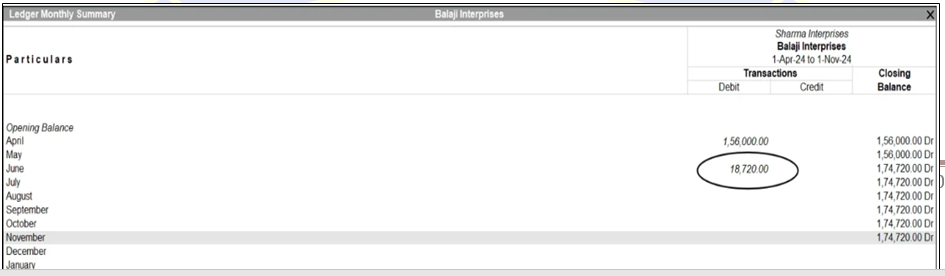
नोट : इसी प्रकार ब्याज भुगतान के लिए Credit Note Voucher का प्रयोग करे तथा Interest Paid क्लास तैयार करे और Interest Paid लेजर बनाए जिसे Indirect Expenses ग्रुप मे रखे।