Create a Budget for Ledger || लेजर के लिए बजट बनाना
व्यापार मे कई प्रकार के खर्चे होते हैं, जैसे- विज्ञापन, स्टेशनरी, बोनस, मेहमानों पर खर्च, चाय खर्च आदि। Tally Prime में किसी खर्च लेजर के लिए बजट बना सकते हैं तथा वास्तविक व्यय और एक विशिष्ट लेजर के लिए निर्धारित बजट के बीच डिफरेंस भी देख सकते हैं। यहाँ हम चाय खर्च (Tea Expenses) के नाम से बजट तैयार करेंगे।
नोट : चाय खर्च से संबंधित बजट बनाने के लिए Tea Expense नाम से पहले से लेजर बना होना चाहिए, क्योंकि बजट क्रीऐट करते वक्त चाय खर्च का लेजर सिलेक्ट करना होगा।
Businesses incur various types of expenses, such as advertising, stationery, bonuses, entertainment expenses, tea expenses, etc. In Tally Prime, you can create a budget for any expense ledger and also view the difference between the actual expenditure and the budget allocated for a specific ledger. Here, we will create a budget under the name “Tea Expenses”.
Note: To create a budget related to tea expenses, a ledger named “Tea Expenses” must already exist, as you will need to select the Tea Expenses ledger while creating the budget.
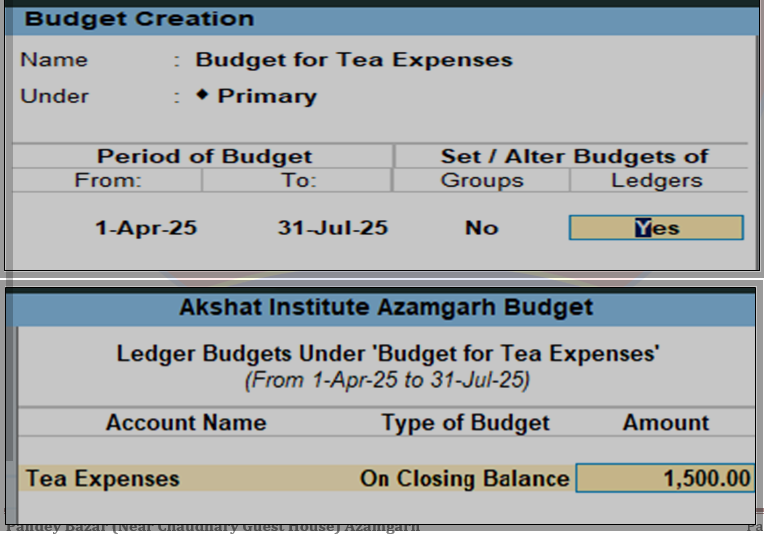
Path : Gateway of Tally>Create>Show More>Budget
- Name : Name मे Budget का नाम दर्ज करें, जैसे – Budget for Tea Expenses
In the Name field, enter the name of the budget, such as – Budget for Tea Expenses. - Under : इसे Primary चुने, अगर Sub-Budget बनाना है तो पहले से तैयार Budget सिलेक्ट करें।
Select this as the Primary budget; if you need to create a sub-budget, select an existing budget first. - Period of Budget : इसमे Budget की शुरुआती और अंतिम तारीख दर्ज करें, कि बजट का कार्यकाल क्या रहेगा।
Enter the start and end dates of the budget to specify the budget period. - Group : इसे No चुने, क्योंकि यहाँ हम Budget लेजर के लिए तैयार कर रहे हैं।
Select No, because we are preparing this for a budget laser. - Ledger : इसे Yes चुने, इसके बाद नई विंडो ओपन होगी जिसे निम्न प्रकार से भरें। Select “Yes,” and a new window will open. Fill it out as follows.
- Account Name : इसमे जिन लेजर का Budget तैयार करना है वह लेजर सिलेक्ट करें। यहाँ Tea Expense नाम से लेजर सिलेक्ट करें, अगर लेजर नहीं बना है तो बना लें।
Select the ledger for which you want to prepare the budget. Here, select the ledger named “Tea Expense.” If the ledger doesn’t exist, create it. - Type of Budget : इसमे On Nett Transactions चुने। लेनदेन की मात्रा को ट्रैक करने के लिए On Nett Transactions तथा खातों की शेष राशि को ट्रैक करने के लिए On Closing Balance सिलेक्ट करें।
Select “On Nett Transactions”. Choose “On Nett Transactions” to track transaction volume and “On Closing Balance” to track account balances. - Amount : इसमे Budget के लिए धनराशि दर्ज करें।
Enter the amount for the budget here.
अब Budget Creation Screen को Accept (Ctrl+A) कर लें
Now, accept the Budget Creation Screen (Ctrl+A).