About Lesson
New Currency Creation || नई करेंसी बनाना
Tally में ₹ (INR) नाम से करेंसी पहले से ही बनी होती है, इसे Base Currency कहते और यह डिफ़ॉल्ट करेंसी होती है। Tally Prime मे नई करेंसी निम्न तरह से बना सकते है।
Tally already has a currency called ₹ (INR). This is called Base Currency and is the default currency. You can create a new currency in Tally Prime as follows.
Path : Gateway of Tally>Create>Currency
- Currency Symbol : $
- Formal Name : US Dollar
- ISO Currency Code : USD
- No. decimal places : 2
- Show amount in millions : No
- Suffix symbol to amount : Yes
- Add space between amount and symbol : No
- Word representing after amount symbol : Cent
- No. of decimal places for amount in words : 2
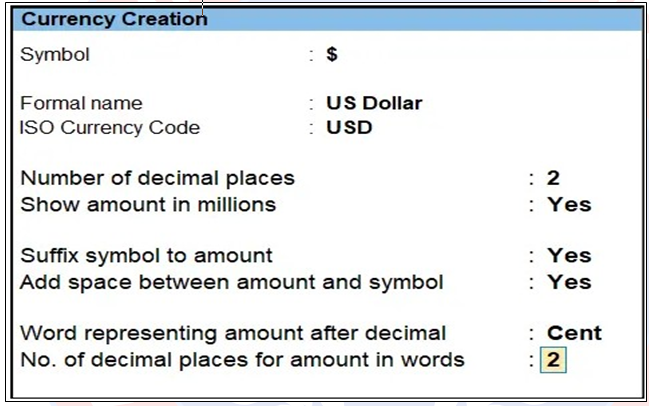
सभी डिटेल्स भरने के बाद Currency Creation Screen को Accept कर लेंगे, इस तरह से नई करन्सी बन जाएगी। अब करन्सी बन जाने के बाद उसका Base Currency से Rate of Exchange सेटअप करेंगे।
After entering all the details, accept the Currency Creation screen, creating a new currency. Once the currency is created, set up the exchange rate with the base currency.