पर्चेज एंट्री | Purchase Entry
Path : Gateway of Tally>Vouchers>Purchase (F9)
उपरोक्त पाथ के अनुसार पर्चेज वाउचर ओपन करें और निम्न प्रकार से जानकारी दर्ज करें-
Open the purchase voucher according to the path mentioned above and enter the information as follows:
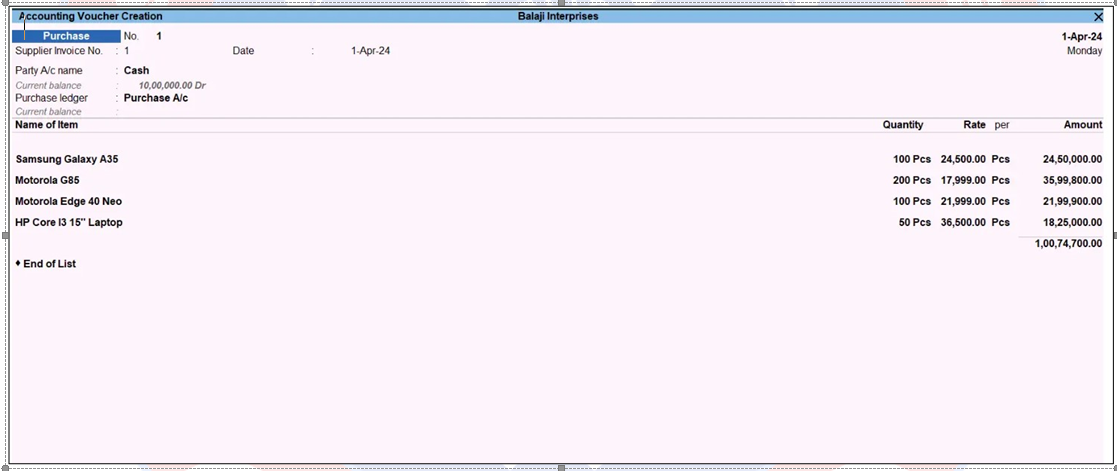
Purchase Voucher Creation
- Voucher Mode : वाउचर मोड Item Invoice होना चाहिए, बदलने के लिए Ctrl+H प्रेस करें।
The voucher mode should be Item Invoice; press Ctrl+H to change it. - Date : वाउचर एंट्री तारीख दर्ज करें। Enter the voucher entry date.
- Invoice No : बिल नंबर दर्ज करें, जो माल खरीदा है।
Enter the bill number for the goods purchased. - Date : बिल की तारीख दर्ज करें। Enter the bill date.
- Party : Cash (नगद खरीददारी के लिए) Cash (for cash purchases)
- Purchase Ledger : Purchase A/c
- Name of Item : इसमे आइटम सिलेक्ट करें Samsung Galaxy A35
Select the item: Samsung Galaxy A35 - Qty : 100
- Rate : 24500
नोट – Samsung Galaxy A35 की Qty और Rate दर्ज करने के बाद इंटर करें और दूसरा स्टॉक आइटम (Motorola G85) सिलेक्ट करें, और उसकी भी Qty और Rate दर्ज करें। इसी प्रकार सभी आइटम्स को एक-एक करके सिलेक्ट करेंगे और उनकी Qty और Rate दर्ज करेंगे। बाकी ऑप्शन को डिफ़ॉल्ट रखते हुए वाउचर Accept (Ctrl+A) कर लेंगे।
Note – After entering the quantity and rate for the Samsung Galaxy A35, press Enter and select the next stock item (Motorola G85), and enter its quantity and rate as well. Similarly, select all the items one by one and enter their quantities and rates. Keep the remaining options as default and accept the voucher (Ctrl+A).
वाउचर एक्सेप्ट करने के बाद खरीदे गए माल की रिपोर्ट Gateway of Tally से Stock Summary में देख सकते है। यहाँ स्टॉक ग्रुप सिलेक्ट करें और वह आइटम सिलेक्ट करें जिसे खरीदा है। Stock Summary में Inward का मतलब खरीदा, Outward का मतलब बेचा और Closing Balance का मतलब उपलब्ध स्टॉक है।
After accepting the voucher, you can view the report of the purchased goods in the Stock Summary section of Gateway of Tally. Select the stock group and then the item you purchased. In the Stock Summary, “Inward” represents purchases, “Outward” represents sales, and “Closing Balance” represents the available stock.