सिम्पल यूनिट क्रीऐट करना | Simple Unit Creation
दोनों प्रकार के यूनिटों के बारे मे जानने के बाद अब जानते हैं की इन्हे टैली मे कैसे क्रीऐट करते हैं। टैली मे यूनिट निम्न पाथ के अनुसार क्रीऐट कर सकते हैं –
After learning about both types of units, let’s see how to create them in Tally. Units can be created in Tally using the following path:
Path : Gateway of Tally>Create>Units
उपरोक्त पाथ इंटर करने के बाद Unit Creation नाम से विंडो ओपन होगी जिसमे डिटेल्स को निम्न प्रकार से भरें-
After entering the above path, a window named “Unit Creation” will open. Fill in the details as follows:
- Type : Simple
- Symbol : Pcs
- Formal Name : Pieces
- Number of Decimal Places : 0
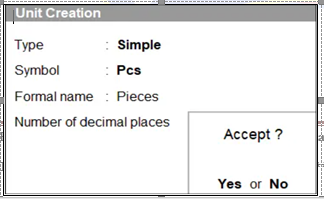
Type : इसमे Simple चुने। Select Simple.
Symbol : इसमे यूनिट का सिम्बल टाइप करें, जैसे – Pcs, Kg, Nos.
Enter the unit symbol here, such as Pcs, Kg, Nos.
Formal Name : इसमे यूनिट का पूरा नाम टाइप करें, जैसे – Pieces
Enter the full name of the unit here, for example – Pieces
Number of Decimal Places : इसमे यूनिट के लिए दसमलव के जितने अंक इस्तेमाल करने है, वह दर्ज करें। Enter the number of decimal places to be used for the unit.
इसके बाद Unit Creation स्क्रीन को Accept कर लें। इस तरह से Pcs नाम से सिम्पल यूनिट बन जाएगा।
Next, accept the Unit Creation screen. This will create a simple unit named “Pcs”.
कंपाउंड यूनिट क्रीऐट करना || Compound Unit Creation
जैसा की ऊपर बताया गया है कंपाउंड यूनिट किन्ही दो सिम्पल यूनिटों से मिलकर बनता है, इसलिए कंपाउंड यूनिट क्रीऐट करने से पहले वो दोनों सिम्पल यूनिट पहले ही क्रीऐट कर लें। माना कोई मात्रा है जैसे 1 Kg 500 Gm तो इसके लिए निम्न प्रकार से कंपाउंड यूनिट क्रीऐट करे।
As mentioned above, a compound unit is formed by combining two simple units. Therefore, before creating a compound unit, make sure that both simple units have already been created. For example, to represent a quantity like 1 kg 500 gm, create the compound unit as follows.
Path : Gateway of Tally>Create>Units
उपरोक्त पाथ इंटर करने के बाद Unit Creation नाम से विंडो ओपन होगी जिसमे डिटेल्स को निम्न प्रकार से भरें।
After entering the above path, a window named “Unit Creation” will open. Fill in the details as follows:
- Type : Compound
- First Unit : Kg
- Conversion : 1000
- Second Unit : Gm
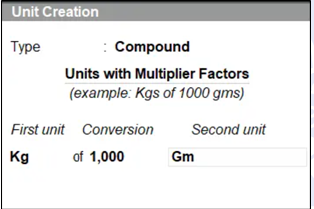 Type : इसमे Compound चुने। Select Compound here.
First Unit : इसमे बड़ा यूनिट चुने, जो मात्रा यानि Quantity मे पहले आएगा।
Choose the larger unit, which will come first in terms of quantity.
Conversion : इस विकल्प मे First Unit का Second Unit के साथ Conversion value भरे।
In this option, enter the conversion value of the First Unit to the Second Unit.
Second Unit : इस विकल्प मे छोटा व फुटकर यूनिट चुनें, जो मात्रा यानि Quantity मे बाद मे आएगा। In this option, choose the smaller or individual unit, which will appear later in the quantity section.
इसके बाद Unit Creation स्क्रीन को Accept कर लें। इस तरह से Kg of 1000 Gm नाम से कंपाउंड यूनिट बन जाएगा।
Next, accept the Unit Creation screen. This will create a compound unit named “Kg of 1000 Gm”.